Building A Product Usage Analysis Agent For Customer Success
How we replaced ad-hoc Metabase queries with an AI agent that serves both Go-to-Market and Product teams

At Alasco, we build financial management software for real estate companies. Understanding how customers actually use the product is critical for Customer Success: which modules they’ve activated, where usage is growing or stalling. For months, that understanding lived inside manual Metabase queries and tribal knowledge. We decided to replace that with an AI agent.
Same data, different questions
The trigger was simple: two people on different teams were doing the same analytical work with different goals. Our Go-to-Market team needed to start from a specific account and drill down into active features, module-level usage, and trends over time. Our Product team needed the inverse: analyze a feature or product area across the entire customer base. Who uses a given feature the most? Which accounts dropped in usage last quarter?
Both drew from the same Metabase data warehouse. Both required the same domain knowledge about what “healthy usage” looks like. But the entry points and outputs were completely different. Dashboards would have meant building two static views that answer only the questions you anticipated. We needed something that could handle the question a CSM asks at 9 AM before a customer call. One nobody planned for.
The setup: shared skill, two agents
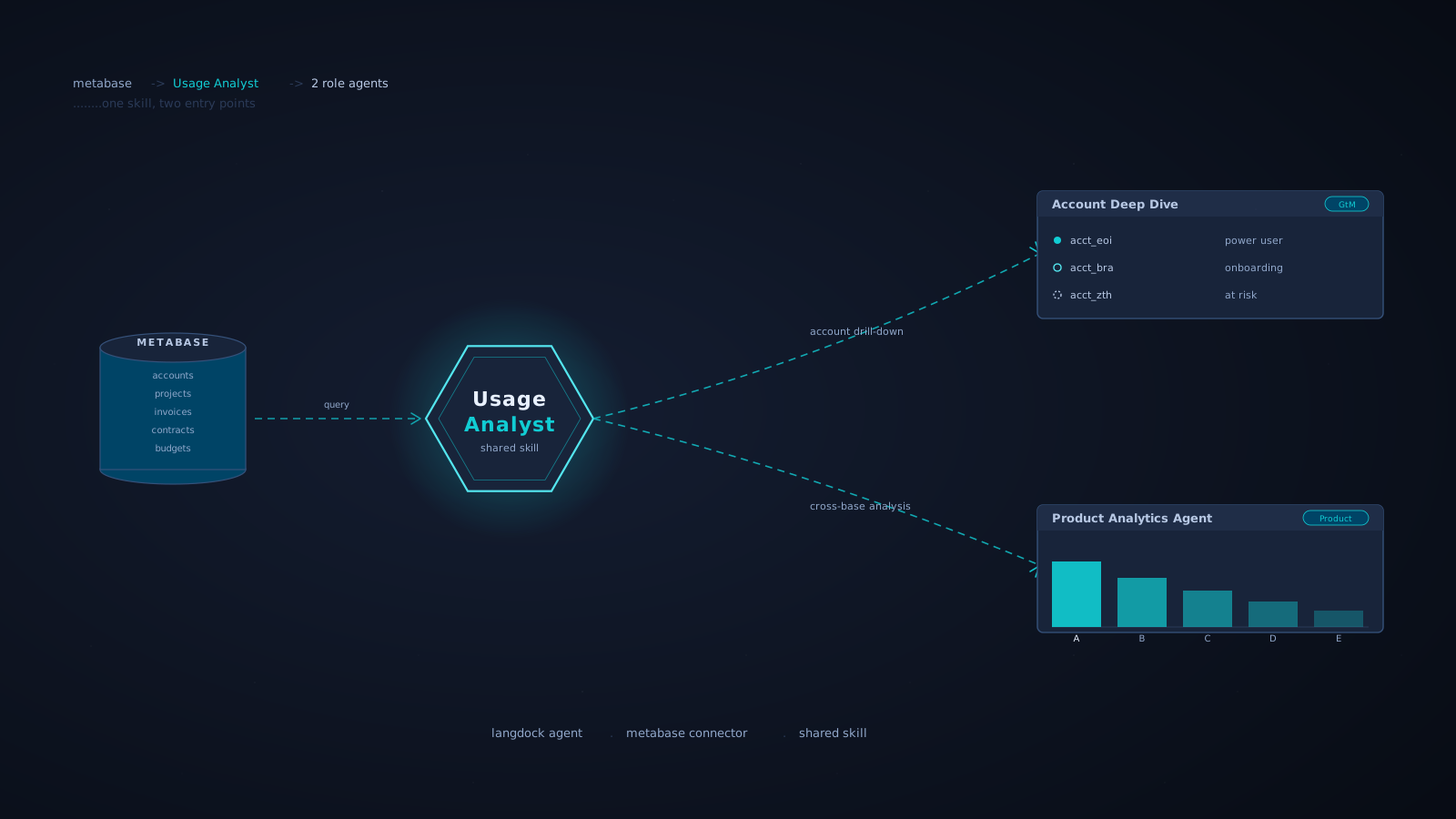
We built a layered architecture on Langdock. The agent setup follows three steps: define the objective (what and why), the procedure (based on our product usage dashboard, defining usage metrics per module: tables, filters, thresholds), and the deliverable format (structured output). The agent uses two actions: a Data Analyst capability and a Metabase integration that queries our product database directly.
On top of this, we created a shared skill called Usage Analyst, the core analytical logic that understands our data model (accounts, projects, users, invoices, cost-element budgets, contract units). This skill powers two role-specific agents:
- Account Deep Dive (GtM-oriented): give it an account, get back active features, module-by-module drill-down, time-frame comparisons, and suggested next steps for the CSM.
- Product Analytics Agent (Product & Engineering-oriented): ask about a feature area and get adoption patterns, usage rankings, and growth trends across the customer base.
The shared skill means analytical logic is maintained in one place. When we improve it, both agents benefit immediately.
What it actually does
The agent handles three categories of questions:
1. Account-level analysis. Point it at an account and it returns an interpretation: whether the customer is a power user, in active onboarding, or at risk. It compares time frames (e.g., recent three months vs. previous three months), flags unused-but-activated features, and generates recommended next steps. For example, it might suggest scheduling a training session for a feature that’s activated but completely unused despite significant contract volume.
2. Cross-base analysis. Ask “who uses a given feature the most?” and it returns ranked tables across the entire customer base: usage counts, totals, and the projects where it’s active. Ask “which accounts dropped in usage?” and it surfaces accounts with declining activity, flagging them for CS outreach.
3. Open-ended exploration. The most surprising use case. Team members ask questions nobody anticipated, and the agent often finds answers. It recognizes patterns like accounts using unconventional project naming for internal clustering, or notices that declining export frequency signals deeper in-product adoption rather than disengagement.
What works and what doesn’t
What works well:
- Performs best with clean, well-structured datasets. Our product database fits this perfectly.
- Finds patterns and insights you didn’t think to look for. It surfaces connections across dimensions that a pre-built dashboard never would.
- Deep account drill-downs with time-frame comparisons give CSMs preparation material, not just numbers.
- Concrete next steps and data interpretation help team members question and understand the analysis, not just consume it.
What doesn’t work:
- Large, messy datasets overwhelm it, even when specifying exact data points.
- The agent occasionally hits processing limits and stops mid-analysis. The workaround is straightforward: ask it to re-run the specific incomplete part. But it’s a limitation.
From experiment to cross-team tool
The agent started as a side project. Within days of sharing it internally, it was being used in CS account reviews, product discovery sessions, and quarterly business reviews. The CS team scheduled a dedicated workshop to walk through use cases and collect feedback. The next extensions are already in progress: dedicated skills for additional product lines and integration with behavioral analytics data.
The key architectural decision was the shared skill layer. Without it, we would have maintained two diverging copies of the same logic (one for CSMs, one for PMs) that would inevitably drift apart.
Takeaways
Agents complement dashboards; they don’t replace them. Dashboards are for monitoring. Agents are for investigation. Forcing one tool to do both is a mistake.
Shared skills beat shared prompts. Early prompt templates worked but were fragile. Every user modified them, and improvements didn’t propagate. A formal skill with a defined interface is maintainable.
Interpretation requires domain encoding. The hard part wasn’t connecting to Metabase. It was encoding what “good usage” looks like in our domain, and that knowledge now lives in the skill, not in someone’s head.