Building an MCP Server Inside a Real Estate Finance Product
Multi-tenancy, auth, tool design, and the lessons from shipping it

Building an MCP server inside a real estate finance product
We spent the last few months building a Model Context Protocol server for Alasco, so AI assistants like Claude, Cursor, and Langdock, and increasingly our customers’ own automation, can work with real construction finance data: projects, contracts, invoices, forecasts, and securities. It runs inside the product rather than as a side project, which shaped almost every decision we made.
A lot of the write-ups on building MCP servers stop at “we wrapped our API and it worked.” The parts that took real thought were the ones underneath: how to keep one customer’s agent out of another customer’s data, how to decide what a given caller is even allowed to see, and why the tools we generated straight from our own Public API eventually had to go. This is what we chose, what we rejected, and what we got wrong on the way.
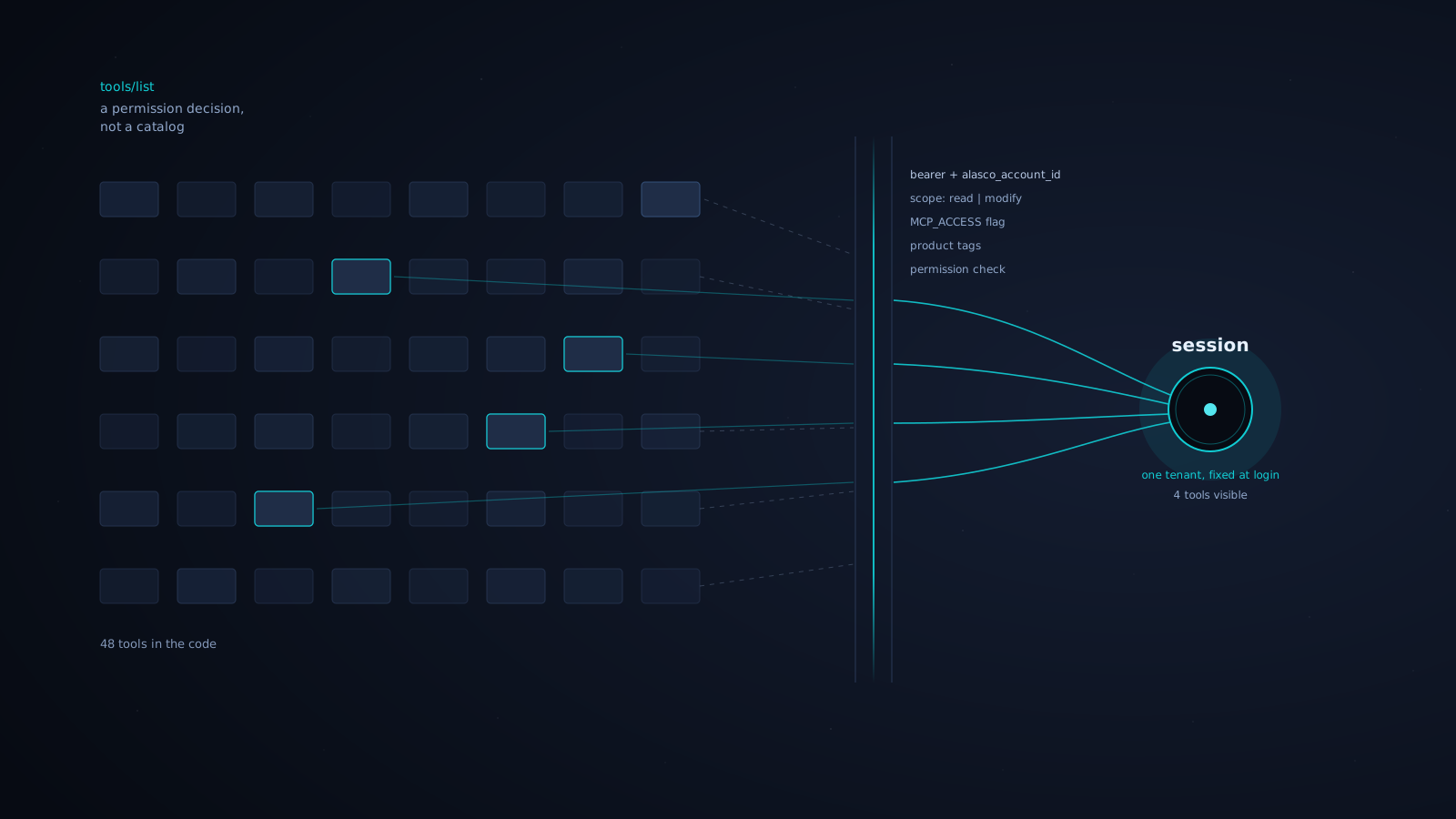
One idea ties most of it together. The tool list is computed per session from permissions, before the client sees any names. Ask two different users what the server offers and they get two different answers, filtered by the account they logged into, the scopes they hold, the products that account pays for, and the tools their role can call. Once we started treating the list that way, the harder questions mostly answered themselves.
One account per session
Every session binds to exactly one account, chosen at login. There is no switching accounts mid-conversation. Want a different account? Log in again. We sign the chosen alasco_account_id into the token, so every downstream call carries the same fixed tenant. Nothing the agent says or does can move it.
We looked hard at the convenient version, where an agent roams across all the accounts a user can reach, and we dropped it. The failure mode is the kind you cannot walk back. An LLM reading the wrong customer’s budget is a privacy problem. An LLM writing to the wrong customer’s budget, because it lost track of which account it was in three turns ago, is the incident you spend a weekend on. A session pinned to one tenant is boring, and boring is exactly what you want when the actions are irreversible.
The trade-off shows up in a real request we got: could someone sweep every account at once to find one supplier’s invoices across a whole portfolio? No, for two reasons. It would need an authorization model we deliberately do not have. And it is the wrong tool anyway. Running thousands of invoices through a language model to answer a question that one SQL query settles in milliseconds burns tokens to do arithmetic badly. The MCP server reasons inside one tenant. Portfolio analytics is a different job with a different shape.
Auth0 for identity, our permissions for authorization
Authentication and authorization are two jobs, and the cleanest thing we did was refuse to let one system do both. PADISO’s guide to multi-tenant agents puts tenant-scoped credentials and monitoring at the center of the design. BrainGrid’s account of shipping its MCP server describes authentication as a game of whack-a-mole until they added a durable session layer. We felt both pressures.
We use OAuth 2.1 through Auth0: a native PKCE client and a resource server that defines two scopes, read and modify. Dynamic Client Registration means Cursor and Claude connect through a normal browser login instead of a pasted API key. We turned down the shortcut of reusing the Public API’s static keys. That would have saved time that day and created a rewrite the next quarter.
The Auth0 token proves identity and carries no roles. Our own permission system, the same one behind the product UI, stays the single source of truth for what a person can do. That separation is what makes the tool list computable. An account without MCP access never appears in account selection. Once a session starts, middleware resolves the user and account, then filters every tool, resource, and prompt before the client sees any of it:
- the server requires a valid bearer with a signed
alasco_account_id - anything tagged
writestays hidden unless the token carries themodifyscope - product tags filter next, so an account entitled only to FinCon never sees appraisal or report-builder tools
- a permission checker runs per tool, using the same role machinery as the rest of the product
- a tool without an explicit permission checker falls through to admin-only
The selected scope sets the upper limit. A read-only token never sees a write tool, even when your role would happily allow the edit. The filter also runs again when a tool is called. Listing is useful feedback, but the call still has to pass the same checks.
Generated tools, hand-written tools
An early version mirrored the API one-to-one and drowned the client in tools. Sierra describes the same problem: dozens of tools can still miss the way people work if they do not cover the full workflow. Clever Cloud makes a similar distinction between generic and domain-specific servers, with the latter better suited to security and predictable behavior.
We started there too. Tools were generated straight from our Public API and forwarded the call through it: broad coverage, little code, auth reused for free. It got something working fast, which was the right call for a first version, but it did not survive contact with real use. We were shortening names to fit client limits, rewriting JSON:API filters into shapes a model could produce, and fighting to compute permissions cleanly against tools that were never built to carry them.
Those hacks came from a structural mismatch. Our Public API has to keep its contract backward compatible. MCP tools do not need the same promise: a client refreshes its tool list every session, and an agent can adapt to a changed tool, often in the same session. Tying our tool definitions to the Public API gave us a stability guarantee we did not need and took away flexibility. We cut the tie. Every tool today is hand-written under mcp/areas/, independent of the Public API contract.
Each tool gets an agent-specific input or output shape, its own prompts or docs, feature-flag gating, an explicit permission check, custom validation, orchestration beyond a single HTTP call, and a smaller, safer surface than a raw endpoint. Tools orchestrate existing product services and do not reimplement domain logic. If the MCP layer starts owning business rules, we have two sources of truth and bugs to chase.
The tool list is a small, hand-built surface. The code contains the full set, but each session sees only the subset allowed by its permissions.
The client that served a stale tool list
The bug that ate the most days was not ours, which somehow made it worse.
The MCP specification gives servers a way to announce a changed tool set: notifications/tools/list_changed. The client is supposed to re-fetch tools/list. Our logs show that handshake firing correctly every time. One popular client then ignored the fresh response and kept serving a stale list from an earlier session. Cursor CLI has a public report of the same failure mode.
The symptom was maddening. A demo account, selected with read and write plus three toolsets, showed up as 23 tools, all read-only, in one client, while the exact same login worked in another. A manual refresh re-served the cache. The only fix that held was removing and re-adding the connector, which removes every agent, skill, and chat that depends on it. It reproduces against an open issue in the client vendor’s own tracker, and their suggested workaround, don’t change your tools dynamically after init, would kill the entire point of per-account, per-scope exposure.
We now treat tools/list_changed as unreliable across production clients and design onboarding around the first list a client sees. The Nylas team reports similar client-side gaps, including unreliable support for parts of the protocol, so we test the first discovery response as carefully as the tool calls themselves.
A feedback tool that reports on the agent itself
A small choice paid off: we built a feedback tool into the server. Because it writes no customer data, only a log line and a Slack message, it stays callable even from a read-only token. When an agent gets confused or hands back something useless, the user or the model itself can report it inline, without leaving the session, and it lands somewhere we actually read.
Agent behavior is opaque in a way dashboards do not fix. You can watch latency and error rates all day and still have no idea why a model gave up halfway through a contract. The feedback from that tool has told us more than most of our metrics.
If we started over
A few things we would put on the wall before starting again:
- Split authentication from authorization, and let your own system keep the roles. Identity providers are good at identity and should stay out of your permission model.
- Make permission decide what a tool list contains, not just whether a call succeeds. Showing only permitted tools makes the interface safer and clearer.
- Pin a session to one tenant. The convenience of roaming is never worth the mutation you cannot undo.
- Do not generate tools from a Public API contract that must remain backward compatible. Hand-write them for the workflows that matter, and never let the MCP layer own domain logic.
- Emit telemetry per tenant from the first commit. Ours grouped by request instead of account, which made debugging a specific customer harder.
- Delete privileged paths the day they go unused. We removed a backend delegation route the moment its only consumer was retired, rather than leaving a spare key under the mat.
- Roll out behind a per-account flag, off by default. We ran on a handful of production accounts and our internal ones long before anyone else saw it.
Pilot feedback has been concrete. One customer called it very promising, another sent a detailed test report, and a third wants to wire it into their own agent for repetitive contract work. That request is useful because the customer wants to build on top of the tools instead of asking for more of them.