
Rust to Python, Rust to WASM
How we implemented a formula language evaluator in Rust that runs over Python and WASM


In our previous post, we described the formula language behind a new product offering at Alasco: calculating whether a construction opportunity is worth pursuing at all. That work used to live in Excel, so we wanted the same flexibility inside Alasco, without the sneaky errors a spreadsheet makes easy.
In this post we cover our journey implementing the evaluator for our formula language.
Backend, frontend, or both?
The first question we had to answer is whether this code was backend-owned or frontend-owned.
In the frontend we needed full responsiveness: you update a number and all related formulas update immediately. This is the level of snappiness that would make our users love the product. And we simply couldn’t afford to wait for an API response.
On the other hand, we also knew we would need to evaluate some formulas in the backend, because we wanted to do async analysis and optimisation tasks over the existing calculations.
Back in November 2025, we were already full gas on AI-assisted development, so implementing the same logic on both frontend and backend was not completely out of the question.
But in this case implementing the logic twice felt like a bad idea. A formula language with an evaluator was a non-trivial undertaking that required multiple layers. We really didn’t want this code living in two different places (and languages) that would need constant syncing and were prone to deviate just because of the different tooling available to each side.
So Rust came to the rescue!
Rust to Python, Rust to WASM
Rust is gaining popularity by the day. As I’m writing this, there is the successful rewrite of Bun, and the rewrite of Postgres in the making. Back in November, we also knew of Astral going heavy on Rust.
We had also gained some experience with an experiment regarding money processing in Rust. So the language seemed like a very good candidate to be the centerpiece of the logic that would run both in the frontend (WASM) and in the backend (Python).
Setting up a Rust project to generate WASM and Python is straightforward (especially with the help of AI). What’s really important is to have a clear separation between the interface to the other languages and the core code in Rust, so that the architecture is clean and each concern can be tested on its own.
For the Python binding we used PyO3, and for WASM we used wasm-bindgen. Both sit at that interface, take a Rust function, and make it callable from the other language.
For example, this is the function in Rust that evaluates a whole tree of nodes with formulas.
pub struct Node {
    pub id: String,
    pub name: String,
    pub formula: String,
    pub value: EvalResult,
    pub children: Vec<Node>,
}

pub fn evaluate_tree(mut root: Node) -> Node {
    // evaluate formulas for every node
    root
}
If you are wondering why we are evaluating trees instead of simple strings, you might want to read this other post before.
As shown in the example code, Rust uses its own Node definition. The evaluation function walks the tree and hands the same shape back with value filled in. Python and JavaScript never see this type directly. The bindings convert at the edge, call the Rust function, and write the results back.
This is how we make this function available to Python using PyO3.
#[pyfunction]
pub fn evaluate_tree(root: &Bound<'_, PyAny>) -> PyResult<Py<PyAny>> {
    let node = convert_python_object_to_node(root)?;
    let evaluated = crate::evaluate_tree(node);

    update_python_object_with_values(root, &evaluated)?;
    Ok(root.clone().unbind())
}

#[pymodule]
mod formulas_module {
    #[pymodule_export]
    use super::evaluate_tree;
}
And this is how we make the same function available to WASM.
#[wasm_bindgen(js_name = "evaluateTree")]
pub fn evaluate_tree(root: JsValue) -> Result<JsValue, JsValue> {
    let node = convert_js_value_to_node(&root)?;
    let evaluated = crate::evaluate_tree(node);

    update_js_value_with_values(&root, &evaluated)
}
Notice the conversion helpers on each side. We didn’t want to scare you with their code in this post, but suffice to say that they copy the tree into Rust, write the evaluated values back, and make sure that the shapes match in both directions.
With types, also
To ensure that both Python and TypeScript can take full advantage of typing, we included a stub file for each language.
For Python we used Protocols, so the actual node type on that side could be anything with the right shape:
from typing import Protocol, Self

class Node(Protocol):
    id: str
    name: str
    formula: str
    value: str
    children: list[Self]

def evaluate_tree[T: Node](root: T) -> T: ...
And similar for TypeScript with a good old interface:
export interface Node {
  id: string;
  name: string;
  formula: string;
  value: string;
  children: Node[];
}

export function evaluateTree<T extends Node>(root: T): T;
Looking inside a new language
I remember taking a Compilers class during my bachelor’s studies and thinking: “Will I ever use this in my professional life?” Well, guess what. I actually got to put a few things into practice: defining a grammar, having a parser on top, and finally making an evaluator make sense of the abstract syntax tree (AST) and produce a result.
For the grammar we used Pest, which is a PEG parser. This is what a grammar in Pest looks like:
value = { SOI ~ (SIGNED_NUMBER | EQUALS ~ expression)? ~ EOI }

expression = { addition_expression }

addition_expression = {
    multiplication_expression ~ (
        PLUS ~ multiplication_expression |
        MINUS ~ multiplication_expression
    )*
}

multiplication_expression = {
    power_expression ~ (
        MULTIPLY ~ power_expression |
        DIVIDE ~ power_expression |
        MODULO ~ power_expression
    )*
}

power_expression = { unary_expression ~ (POWER ~ unary_expression)* }

unary_expression = { (PLUS | MINUS)? ~ atomic_expression }

atomic_expression = {
    NUMBER_OR_PERCENT |
    NODE_REFERENCE |
    CHILDREN_REFERENCE |
    RIGHT_REFERENCE |
    function_expression |
    aggregation_expression |
    conditional_expression |
    EMPTY |
    LPAREN ~ expression ~ RPAREN
}

// more rules defined here
A minor issue with PEG parsers is that they are greedy. It will try alternatives from top to bottom, and once a rule succeeds, it won’t come back to try a different match. Greedy parsers also fail the whole parse if anything is off, which is the right behaviour for evaluation alone, but not for a few other things we needed to do with a formula. For instance, we wanted to extract “tokens” from an incomplete formula in order to highlight them, even as they were being written.
For this we had to write a tokenizer that would sit next to the parser, not in front of it. A classic compiler would tokenize first and parse second. We already had Pest for complete formulas, so we reused its leaf rules in a second pass that never gives up midway through: it walks the string left to right, tries the longest match first, and if a stretch of input matches nothing, it emits an “unexpected” token and continues. This makes the highlighting task possible and also pretty forgiving.
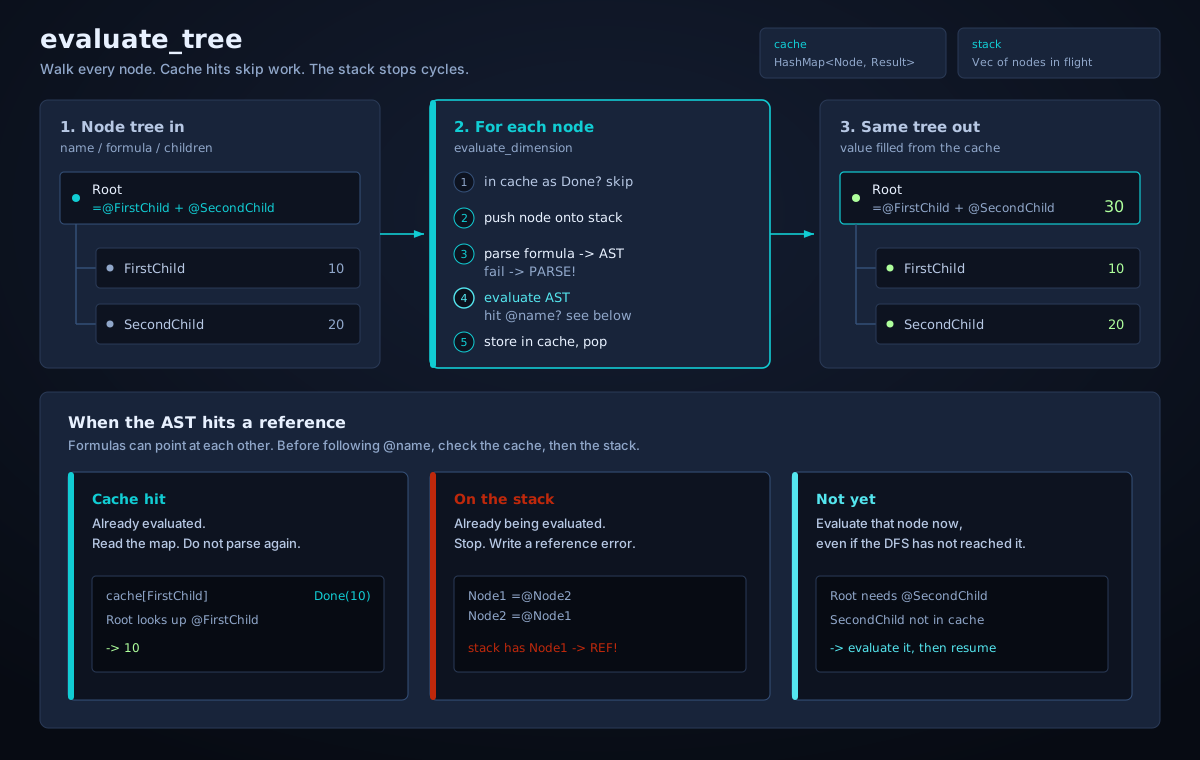
With an AST at hand, the evaluation is literally “a walk”. However, two things made the tree walk for us less trivial than a simple calculator.
First, we used cache. A node that is referenced from several places should not be parsed and evaluated repeatedly, so we made results go into a map keyed by node.
Second, because formulas can point at each other, nodes can generate circular references. For this we kept a stack of the nodes currently under evaluation. Before following a reference, we check that stack. If the target is already there, we stop and write a reference error as the result.
The diagram below shows the process we just described:
Testing in three languages
Because we had three languages at play, we wanted to make sure that calling the evaluator through any binding produced the same results. Therefore, we needed a way to run the same test suite from three different languages, without actually duplicating all the cases.
We came up with the idea of defining test cases as JSON files, with inputs and outputs. Then we only had to write the test runner three times, once per language. That was an acceptable compromise.
This is how our test files look like:
{
  "test_node_references": [
    {
      "input": {
        "id": "root",
        "name": "Root",
        "formula": "=@FirstChild + @SecondChild",
        "children": [
          {
            "id": "first",
            "name": "FirstChild",
            "formula": "10",
            "children": []
          },
          {
            "id": "second",
            "name": "SecondChild",
            "formula": "20",
            "children": []
          }
        ]
      },
      "output": {
        "id": "root",
        "name": "Root",
        "formula": "=@FirstChild + @SecondChild",
        "value": "30",
        "children": [
          {
            "id": "first",
            "name": "FirstChild",
            "formula": "10",
            "value": "10",
            "children": []
          },
          {
            "id": "second",
            "name": "SecondChild",
            "formula": "20",
            "value": "20",
            "children": []
          }
        ]
      }
    }
  ]
}
Each named entry is a list of cases. The runners in Rust, Python, and JavaScript load the same file and assert that evaluate_tree turns input into output.
A kind of a language server
Our frontend editor still needed autocomplete, information on hover, and syntax highlighting. Reconstructing the knowledge of the language in the UI would have been the same duplication we had just refused for evaluation. So we had a cool idea: what if we implemented a language server? Well… sort of.
In reality, we did not set up a real language server. We just added a few of the standard functions in the Language Server Protocol, namely get_completion_items, get_hover, and get_semantic_tokens.
Completions suggest built-ins and node references from the tree you are editing. Hover explains a function or shows the value of a referenced node. Semantic tokens are the highlighting stream, in a shape that editors already understand. The formula editor calls them through the same WASM binding as evaluate_tree.
Even though it was not a real language server, borrowing the standard meant we didn’t have to invent our own protocol for these common use cases.
Back to Excel, just in case
As much as we started this journey trying to convert users from Excel into our platform, we knew from the beginning that some of them would still want a spreadsheet they could take home.
So, following the same principle as the language server, we thought there was no better place to convert our formula language into Excel than the Rust library itself.
The basic idea was simple: something outside the library decides which Excel cell each node will occupy. The library then takes that mapping and returns every formula rewritten with those cell references, in Excel’s own language.
Still strong
A final confession: we implemented almost all of the code using LLMs, but we designed the layers and components ourselves. That gave us incredible speed of development, which in turn allowed us to learn fast what the language needed in order to be more user-friendly. We then iterated on the changes at the same speed. The whole project would have been possible before the era of AI, but it would have taken us much more time to juggle the not-so-familiar Rust language, its documentation, plus debugging a thousand little things that came along the way.
Six months later, the same language that we designed to accommodate a new product offering has already found its way back into our main product. It now powers a feature for adding custom columns to Cost Control, one of the most beloved features for our customers.
So Rust is officially now in the codebase. We just need a nice crab badge to put next to our logo.