
The joy of designing a language
How we designed a formula language around trees instead of grids

Since its founding in 2018, Alasco’s main product offering has always been controlling the finances of construction projects that are already in development. What we always lacked was a tool to calculate the feasibility of potential projects, so that our customers could decide confidently what to build, in addition to controlling what is being built. In November 2025, we embarked on a journey to bridge this gap.
Evaluating a potential construction opportunity requires much more flexibility than traditional project controlling: there are more variables, more branching options, fewer standard dimensions. This task has traditionally been done in Excel, which provides maximum flexibility for calculations, but has few of the features for an enterprise environment, where access control, traceability and accountability are paramount.
We knew from the beginning we would need a language to express formulas. A language as potent as Excel, but more user-friendly and less prone to hard-to-detect errors.
This post is the first of a series of two about how we designed and implemented this language. This one is concerned with the design part. The next one describes the implementation.
You may have noticed the title of this post and wondered: can there be real joy in having to come up with an Excel sibling? Well, software engineering is mostly about problem solving, and when problem solving intersects the space of elegance, beauty and simplicity, there can be real joy at the task at hand.
Trees instead of grids
Excel evaluates against a grid of cells.
We looked at how money already lives in Alasco and realised that a tree of nodes was a better fit for us. Budget planning, cost control, cash outflow: they are all structured in hierarchies. Cost elements contain more detailed cost elements. You can start a budget at a high level and later fill in children without contradicting the early number, as long as the parent is later defined in terms of those children.
Nodes also offer something that is hard for a cell to match: a name! Well, yes, cells have B2 and AA999, but those names are hard to connect with the meaning of the actual value living in those coordinates. We wanted our users to be able to write @Price and know immediately what they were referencing.
Using @ for referencing felt obvious, since Notion, Slack, and perhaps every social network do it like this.
A familiar language
Our goal was to make someone who thinks in Excel be productive in an afternoon. So as you may expect, a formula for us is still a number, or = followed by an expression, or even an empty value. Precedence of operators respects the good old math rules, and functions like round and abs are all there.
Things like sum and avg are also there, but they work slightly differently than the other functions. round and abs have a predictable number of arguments, whereas the others can have as many arguments as needed. Arguments are separated with ; the way Excel already does it (at least in Germany):
=sum(@{Acquisition costs}; @{Construction costs}; @{Legal costs}; ...)For comparisons we let the Python language spoil us a bit. Excel reuses = for equality (e.g. =A1=B2), but we went with == instead. Inequality is represented using != or <>. and, or, and not are also there, but as operators instead of functions:
=if(@Revenue > 0 and @Cost > 0; @Revenue - @Cost; 0)Ranges are not part of this language. Because we operate with trees, we thought that embracing the hierarchy was a better approach. Therefore we made it possible to reference direct children using that keyword.
And that’s pretty much the language.
Everything is a number, error, or empty
We needed this evaluator for numbers. Dates, strings, and other complex types were tempting from a purely language design perspective, but they would have made the evaluator much more complex, without a clear product value. So we went for simplicity as a design choice.
Therefore, a finished formula evaluates to only three possible things: a number, an error, or empty.
A couple of other types exist, but only in the middle of an evaluation.
Comparisons produce booleans, but they are legal only as the condition of if.
children produces an array, and while we can do some interesting things with arrays (more on this later), if an array ever becomes the final result of a formula, the actual result is a MANY! error.
Empty is a real value. A node with no formula is valid, and it evaluates to empty. There’s also the keyword empty that produces, well, empty. We mostly use it for testing.
The errors we ended up with were these four:
ERROR!for a formula that does not parse.VALUE!for arithmetic that cannot be done, like division by zero.REF!for a missing node, a cycle, or a reference to a node that already errored.MANY!when the result would have been several numbers at once.
We were opinionated about the third one. If @Broken’s result is an error, then =@Broken + 1 is a REF!. Errors from other nodes do not propagate their original “reason”. They become a reference problem instead: from the caller’s point of view, what matters is that this reference did not yield a usable value.
What is truly a reference?
Users can type @Name, or @{Very long name} when the name has spaces and punctuation. Nested braces are fine as long as they balance: @{Testing {the} {{limits}}} is risky, but possible.
But names have a major problem: they are not unique. Forcing uniqueness would have been painful in a tree where “Price” can show up twice in different branches, and that’s perfectly fine. So even if the UI showed a name, we still had to decide what a formula would actually reference.
This was the spiciest decision of all.
References as names
Storing a name as a reference had a bunch of advantages:
- The UI and the data look the same, so no translation layer is required.
- A formula could also mention a node that did not exist yet. For instance, you could write a “formula template” now and add the referenced nodes later. Before the reference exists, the template results in an error, but the moment the nodes with the name appear, the formula just works.
- You could even delete a node and recreate it with the same name, and the formula would recover without issues.
But the downsides were tricky. A “rename of a node” would break every formula that still had the old name, unless we ran a global fixing procedure on every rename. And most critically, because names would not be unique, we had to be able to deal with duplicates.
For dealing with duplicates we had a few options on the table:
- Forcing uniqueness: like we said, this was too limiting, so we threw it out immediately.
- Rejecting ambiguity: any ambiguous references would result in an error.
- Embracing (and resolving) ambiguity: for example, by providing a way to attach a numeric index, so that
@{Duplicated name}[3]could be the third match in tree order; or by picking the closest node by some distance metric; or by using the path to the root, which would have required unique names among siblings (something we also did not want).
As you can see, those strategies for resolving ambiguity are very sensitive to the order of nodes in the tree. Move a node, and [3] might mean something else.
References as IDs
Storing IDs as references, on the other hand, had its own pros and cons.
Because IDs are unique, references would always be unambiguous. Renaming a node would be trivial: change the label, keep the ID, formulas never know.
But the other side was uglier. First, we would have had to transform formulas between UI and storage. Second, nodes that didn’t exist yet could not be referenced, which would have made the creation of “template nodes” harder. Finally, a deleted node would stay broken forever: even if the node was recreated with the same name, it would still be a different ID, so the formula would never recover.
Making a hard choice
After many debates we finally went with storing the name. But IDs played their role as well.
Because every node still has an ID, when someone renames a node, we walk the old tree and the new one, match by ID, and rewrite every @{Old name} with @{New name}. This is the formula-fixing procedure we knew we were going to need. The procedure is also capable of taking newly created “ambiguous nodes” out of ambiguity.
And for duplicates we did not invent a distance metric, nor did we require unique siblings. We actually went with indexes. One-based indexes! This means that @{Duplicated node}[1] references the first occurrence of a node with that name in a depth-first walk of the tree.
But we also embraced the ambiguity of an unindexed node: if the index is omitted, then @{Duplicated node} returns an array of all occurrences of that name, similar to how children returns an array of all direct descendants. However, the basic rules apply. If an array is the final value of a formula, you’ll get MANY!. If you use it in arithmetic expressions, or in places where it is not expected, other errors will follow.
But like we said before, we could also do some interesting things with those arrays.
Interesting things you say?
The most common formula we knew we would find in our trees would be: sum my direct children. And for good reason: most of the parent nodes only made sense as aggregating their children.
So how could we express that in a convenient way?
We already said that things like sum and avg operate on an arbitrary number of arguments, and that children returns an array. Therefore, the most consequential decision for us was to provide an “unpacking operator” (e.g. *list in Python) to be able to do things like =sum(*children).
But you know what? We didn’t! That unpacking operator would have been the delight of a software engineer, but not of our customers. We really wanted to stay simple and be able to do =sum(children). So we did.
Was it a clean choice? Let’s put the rule under the microscope: things like sum and avg are called “aggregators” anyways (not just normal functions like round and abs), so they can take an arbitrary number of arguments. The convention followed: if one of those arguments is an array, it is spread automatically.
So this is a valid formula:
=sum(@Node; 5; children; 1)And the effect is that children are automatically spread as if they were entered one by one, separated by semicolons.
Furthermore, a side effect of embracing node ambiguity was that you could spread ambiguous nodes inside aggregators, so that the following formula actually adds up all nodes with the same name:
=sum(@{Duplicated node})The Pandora’s box of arrays and indexes
When we explained how we solved node ambiguity by using indexes (e.g. @Duplicate[1]), we never really went deeper into those “indexes”, which actually opened a little Pandora’s box.
The question: are indexes a legal construct that can be attached to any expression that returns an array, or a specific suffix to certain elements of the grammar? In other words, as much as @Duplicate[1] is legal, should the following be legal?
=if(1<2; @Duplicate; @{Other duplicate})[1]As a similar example, imagine a node called Mirror that has this formula: =@Duplicate. Should it then be possible for a third node to do =@Mirror[1] and actually get @Duplicate[1] by resolving Mirror as an expression?
This was another case where the “design curiosity” of the software engineer needed to take lower precedence than what was best for the user.
We decided against making indexes applicable to any expression, and made them instead special suffixes of certain elements of the grammar, like node references and children.
So yeah, we didn’t let our users do =(((@Duplicate)))[1], but at least we let them reference the first child of a node if they wanted to, by using =children[1].
Other problems with the emptiness
Coming back to how “aggregators” take an arbitrary number of arguments and how array-returning expressions are automatically spread inside them, we still needed to solve the case of zero arguments.
What to do with =sum() or =sum(children) if there are no children?
In a finished spreadsheet grid, an empty aggregation is often a sign that something is missing. In a tree, where parents are almost always =sum(children), treating a lack of children as an error would have made early planning miserable.
As a first thing we agreed on treating “no arguments” and “an empty array” as the same situation. That is, =sum() and =sum(children) on a node with no children should mean the same thing.
But regarding what to make out of that expression, we had to decide from a number of choices:
- Always producing an error: this was too limiting for a tree that starts flatter and grows deeper over time.
- Producing a value if reasonable, an error otherwise: for instance,
sum()can be zero,count()can be zero, butmin()cannot clearly be resolved. Spreadsheets are messy here:SUMof nothing is 0,MINof an empty range is also 0 (which we didn’t want),AVERAGEof nothing is an error. We wanted one rule, customised per aggregator. - Producing empty: this is what SQL does: aggregating over zero rows returns null, and empty would have been our local equivalent.
After some debate, we went with producing a value or error, whatever was most reasonable. So sum() is 0, count() is 0, but min(), max(), and avg() have no reasonable result, so they scream with VALUE!.
Errors, coercions and ignores
On the topic of errors we also had to decide a few things. For instance, how big of a deal they would be if encountered anywhere in a formula.
A spreadsheet if does not evaluate the unused branch, so we had no reason to do otherwise: =if(1>2; 1/0; 1) will happily resolve to 1. The bad branch cannot poison the whole formula.
But if the evaluation does hit an error, we decided to make it stop right there. =1 + 1/0 is a VALUE! because 1/0 is a VALUE!. Errors are never coerced into numbers. That decision was loud and clear.
Empty was a longer argument. If an empty value is combined with numbers, e.g. =@{Node with empty value} + 1, what to do? Again, three options on the table:
- Producing an error: this was very limiting in a planning tool where many cells would start blank.
- Producing empty: one blank child would blank the parent; empty would have spread like a virus.
- Coercing empty to zero and continue: this is what spreadsheets do with a blank cell, and it’s the most flexible option.
So we did the same and made =empty + 1 equal 1.
But the fun was not over, because we also needed to make a decision on certain aggregations.
Things like sum are quite lenient when it comes to operating with empty values, as a sum doesn’t really care whether empty is zero or skipped. However, other aggregators like count and avg are way more sensitive.
This time we only had two options:
- Always coercing: empty counts as zero, so it participates in
countand affects the result ofavg. - Ignoring arguments with empty values: this is the usual spreadsheet behaviour.
So we also followed suit and made =count(children) and =avg(children) ignore children with empty values.
Multi-dimensional nodes: the final boss
I’ll be honest. At this point we really thought we had everything ironed out. But unfortunately we didn’t.
The final boss appeared in the shape of multi-dimensional nodes.
Allow me to explain. There are some more complex project opportunities to evaluate, and those must be calculated and compared internally using multiple dimensions. For instance, a building with multiple floors can have some floors with commercial usage, others with residential usage. In a case like this, it is to be expected that formulas (and the base values of those formulas) are different from each other. And no, treating each “usage type” as a separate, identical tree was not good enough for us. So we really had to add “columns” to our trees, without falling into the A1+B2 pit.
We spent quite some time on the drawing board. Should we introduce names to those columns and let nodes be referenced both by node name and column name? That would have certainly been another shape of A1+B2, only looking like [email protected] + @Price.Commercial. We resisted this path.
We then realised that precisely this “column jumping” was one of the main sources of errors in the existing spreadsheets of our customers. Exactly what we wanted to design a better solution for.
So we took the simplicity axe one last time and cut straight through the boundaries of the columns, and we then proudly declared: Henceforth shall no node in any column reference any other node in any column other than the same column.
It was simple and it was beautiful.
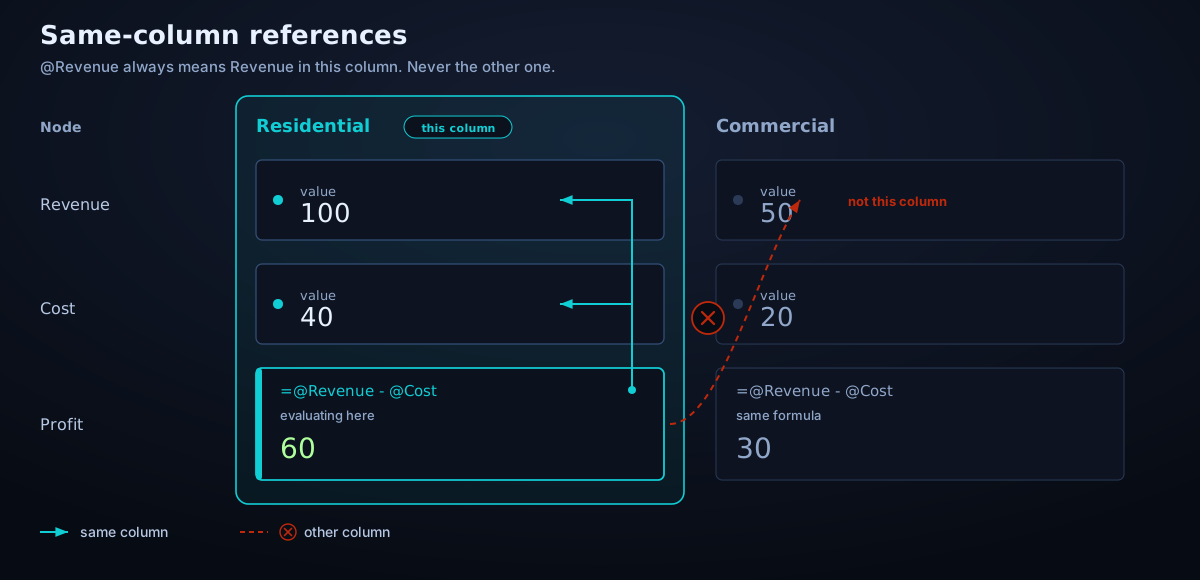
At this point we could retain the language exactly as we had it… with literally only two exceptions:
First, we needed a way to aggregate horizontally inside the same node. For that we added the construct right, analogous to children. right would then return an array of the values of the same node to the right of the referencing position. And right[1] does exactly what you think. This approach made columns quite sensitive to reordering, but that was a risk we were willing to take for the sake of language simplicity.
Lastly, we actually needed one way to break the same-column rule. By introducing right, we had implicitly given the leftmost column a semantic burden: to be the only possible place to calculate the horizontal aggregation across all dimensions. So we realised it was convenient to allow referencing the leftmost dimension of another node sometimes.
Therefore we introduced one more construct: total(@Node), which would resolve to whatever value was in the leftmost column of Node. We could have called it leftmost to scratch the engineering itch, but we thought of our customers again. As one extra nicety, we figured that the top use case for this column-breaking pattern was to apply ratios of one node to another, so we also allowed ratio(@Node) as a shortcut for @Node/total(@Node).
And that, my dear readers, was truly the end: the language worked, the most common formulas could be written in the simplest form, and almost all of the use cases from Excel could be expressed in the new idiom. Joy!
But none of these choices would have mattered if the evaluation engine had disagreed with itself. So if you want to know how we actually took this language from the ivory tower into the codebase, kindly continue reading the next and final post in this series.